
eSIM for Camping and Remote Area Travel: Stay Connected Off-Grid
You have packed your tent, laced up your hiking boots, and plotted a route into the backcountry. But what about staying connected? Whether you need to check weather alerts, send GPS coordinates to a friend, or simply want to upload a trailside photo, having mobile data in remote areas can make the difference between a comfortable trip and a stressful one. An eSIM gives you a practical way to get cellular coverage without hunting for a local SIM card shop that probably does not exist anywhere near your campsite.
This guide breaks down how eSIM technology works for camping and remote area travel, which providers offer the best rural coverage, and what you can realistically expect when you leave the city behind.
Why connectivity matters in remote areas
The appeal of camping is getting away from it all. Nobody is arguing with that. But “off the grid” does not mean you should be completely unreachable if something goes wrong. Emergency services, weather updates, and navigation apps all rely on some form of connectivity. The Federal Emergency Management Agency (FEMA) recommends that hikers and campers maintain a way to contact rescue services, especially in unfamiliar terrain.
Beyond safety, practical reasons for wanting data access while camping include downloading offline maps before you lose signal, checking trail conditions, coordinating with other members of your group, and sharing your location with family back home. You do not need a blazing-fast 5G connection for any of this. Even a slow data link can handle messaging and basic navigation.
How eSIM works for outdoor travel
An eSIM is a digital SIM embedded in your phone’s hardware. Instead of swapping a tiny plastic card, you download a carrier profile through your phone’s settings. The GSMA, the global body that sets mobile standards, designed the eSIM specification so that any compatible device can switch between carrier profiles without physical contact.
For campers and remote travelers, this matters in two ways. First, you can set up your eSIM data plan before you leave home, while you still have reliable WiFi. No need to find a phone shop at your destination. Second, many eSIM providers partner with multiple local carriers in each country, so your phone can roam across whichever network has the strongest signal in a given area. That carrier flexibility is exactly what you want when you are driving through patchy coverage zones on the way to a national park.
💡 Pro Tip
Install your eSIM profile at home before you leave. Most eSIM activations require a QR code scan or an app download, both of which need an internet connection you might not have at the trailhead.
Best eSIM providers for camping and remote coverage
Not all eSIM providers are equal when it comes to rural coverage. The key factor is which local carrier networks they partner with. A provider that only connects to one network in a country will leave you with dead zones that a multi-carrier option might cover. Here are the providers that perform well outside city limits:
Airalo operates in over 200 countries and territories, partnering with local carriers in each region. Their regional plans (like “Europe” or “Asia”) let your phone connect to multiple networks, which is useful when camping near national borders. According to Airalo’s coverage data, their plans connect to major national carriers that typically have the widest rural reach. Prices start around $4.50 for 1GB.
Holafly stands out for camping trips because many of their plans include unlimited data. When you are in a remote area and unsure how much data navigation and weather apps will consume, not having to worry about a data cap removes one problem from your trip. Holafly covers 170+ destinations and their unlimited plans start at roughly $6 per day.
Nomad eSIM is worth considering for multi-country trips, particularly if your camping route crosses borders. Their regional plans cover groups of countries under a single data allowance, and they connect to multiple carriers per country. This multi-carrier approach is the most important factor for remote area coverage.
Ubigi, backed by Transatel (a subsidiary of NTT), provides eSIM data plans across 190+ countries. Their partnership with major telecom groups means they typically connect to the dominant national carrier in each country, which tends to have the best rural infrastructure. Ubigi is also embedded in some Windows laptops and tablets, which could be useful if you bring a laptop to camp.
Coverage realities: what to expect in the wilderness
Here is the honest truth: no eSIM will give you coverage in a true dead zone. If there are no cell towers within range, no SIM (physical or embedded) will connect you. The FCC’s broadband coverage maps show that large portions of national forests and wilderness areas in the US have no cellular coverage at all. Similar gaps exist in remote regions across Canada, Australia, Scandinavia, and much of South America.
That said, an eSIM still helps in several scenarios. Many “remote” campsites are not truly off-grid. State parks, popular hiking areas, and campgrounds near small towns often have usable signal from at least one carrier. An eSIM that roams across multiple carriers gives you the best chance of finding that signal. You might get nothing from one network while another has two bars of LTE.
Coverage also varies by country. In Western Europe, cell towers are relatively dense even in rural areas. The European Commission has been pushing to expand 4G coverage to 99.5% of populated areas by 2030. In countries like Germany, France, and the UK, you will often get a usable signal at established campsites. In contrast, camping in Patagonia, the Australian outback, or northern Canada means accepting real dead zones.
📝 Important note
Check coverage maps before your trip. Both OpenSignal and carrier-specific coverage checkers will show you what kind of signal to expect at your destination. Download offline maps as a backup regardless.
eSIM vs satellite communicators: which do you need?
If you are heading into genuinely remote backcountry with no cell coverage, an eSIM alone will not cut it. Satellite communication devices like the Garmin inReach or the satellite SOS feature on iPhone 14 and later models use satellite networks rather than cell towers. These work almost anywhere on Earth with a clear view of the sky.
But satellite communicators have serious limitations. Data speeds are measured in kilobits, not megabits. You can send short text messages and SOS alerts, but forget about loading a webpage or sending photos. The devices also require subscription plans that cost $12 to $50 per month on top of the hardware.
The smart approach is to carry both. Use your eSIM for regular data whenever you have cell coverage (checking weather, navigation, messaging). Keep a satellite communicator as your emergency backup for areas where cell signal drops completely. This layered approach gives you the best mix of functionality and safety without relying on a single technology. The National Park Service recommends carrying multiple communication methods when hiking in wilderness areas.
Setting up your eSIM before a camping trip
Preparation is everything with eSIMs for remote travel. Once you lose connectivity, you cannot download a new eSIM profile. Follow these steps before you leave home:
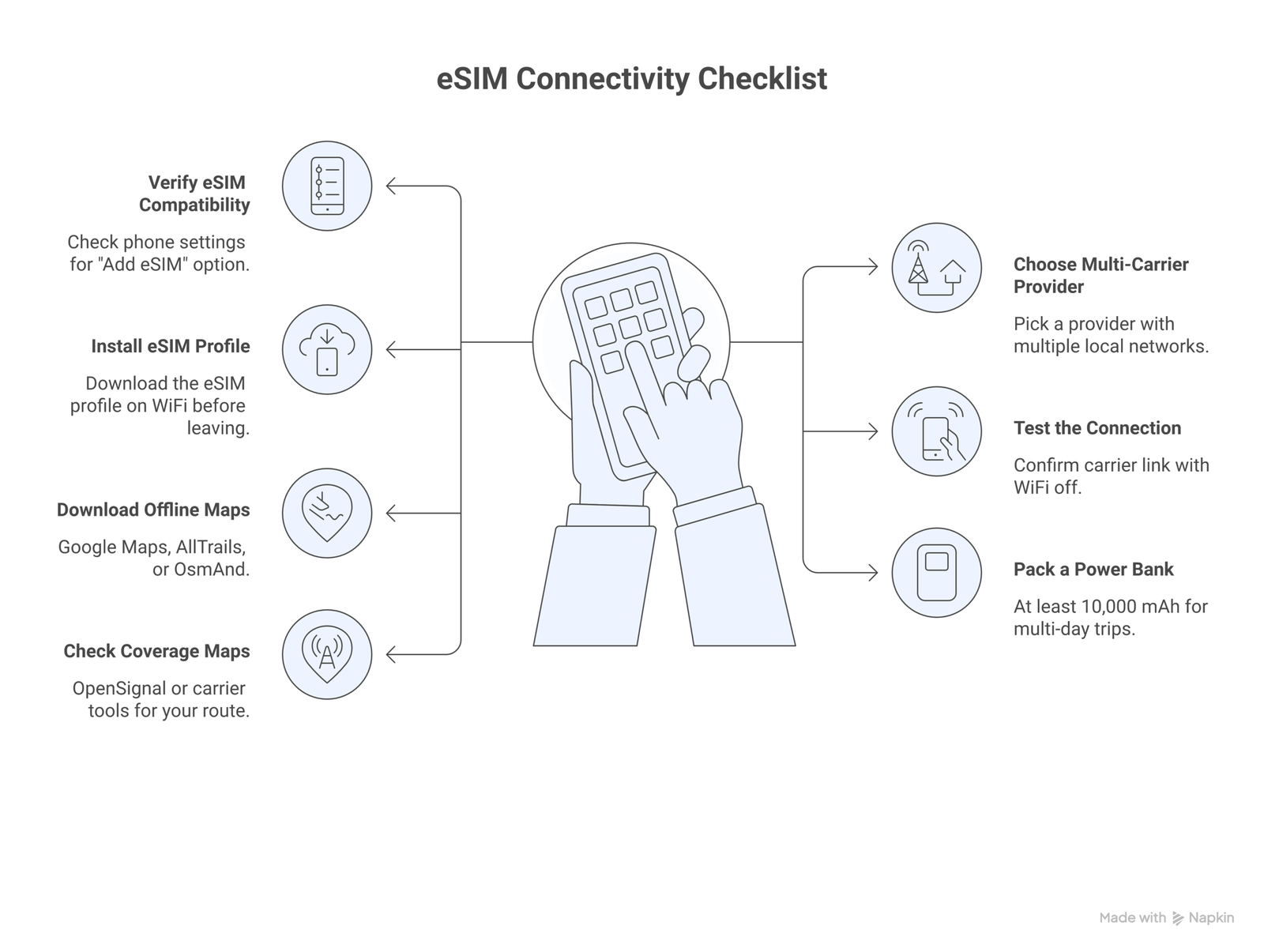
1. Verify your phone supports eSIM. Most phones released after 2020 do, including iPhones from the XS onward and Samsung Galaxy S20 and later. Check your phone’s settings under “Cellular” or “Mobile Network” for an “Add eSIM” option. The Apple support page lists all compatible iPhones.
2. Choose a provider with multi-carrier coverage in your destination. Check which local carriers the eSIM provider uses. If you are camping in the US, you want access to T-Mobile or AT&T networks, which typically have the widest rural footprints. In Australia, Telstra has the best outback coverage by far.
3. Buy and install the eSIM profile while on WiFi. The installation process takes about five minutes. You will scan a QR code or use the provider’s app. Once installed, the eSIM profile stays on your phone even without an internet connection.
4. Test the connection before you leave. Turn off WiFi and confirm your eSIM connects to a local carrier. This way, you know everything works before you drive three hours to your campsite.
5. Download offline resources. Even with an eSIM, assume you will lose signal at some point. Download offline maps through Google Maps or AllTrails, save any important route information, and screenshot key details you might need offline.
✓ Pre-trip connectivity checklist
- ✓ eSIM installed and tested before departure
- ✓ Offline maps downloaded for entire route
- ✓ Emergency contacts saved (not just in cloud)
- ✓ Coverage map checked for destination area
- ✓ Backup communication method packed (satellite device or whistle)
- ✓ Phone fully charged with portable power bank
Saving battery life while using eSIM outdoors
Your phone’s battery drains faster in areas with weak signal because it constantly searches for towers at higher power levels. In remote camping areas, this can kill your battery in hours instead of the usual full day. A few adjustments will help you stretch your charge.
Turn on airplane mode when you know there is no coverage, and only enable cellular when you want to check for signal. This single change can double your battery life. Use low power mode, turn off background app refresh, and reduce screen brightness. If your phone supports it, disable 5G and force it to use LTE only, since 5G uses more power and rarely exists in rural areas anyway.
Carry a portable power bank rated at least 10,000 mAh. Solar chargers work too, though they charge slowly and need direct sunlight for several hours. For multi-day trips, a 20,000 mAh power bank gives you roughly four full phone charges.
Best countries for camping with eSIM coverage
Rural coverage varies dramatically between countries. Here is a realistic look at where eSIMs work well for camping and where you should expect gaps.
Strong rural coverage: South Korea, Japan, the Netherlands, the UK, and Germany all have dense cellular networks that extend well into rural areas. Camping in these countries, you will usually have at least 3G coverage even at less popular sites. Japan’s Ministry of Internal Affairs and Communications reports over 99% population coverage for 4G.
Decent coverage with gaps: The US, Canada, France, Spain, and Italy have good coverage along highways and near towns, but national forests and mountain areas often have dead zones. In the US, T-Mobile and AT&T have expanded rural coverage through government subsidy programs, but vast stretches of the American West remain uncovered.
Limited coverage: Australia (outside of Telstra’s network), most of Africa, central Asia, the Amazon basin, and Patagonia have limited cellular infrastructure outside cities. If you are camping in these regions, plan for extended periods without any signal.
Using dual SIM for maximum coverage
Most modern smartphones support dual SIM configurations, which lets you keep your regular physical SIM active alongside an eSIM. For camping trips, this gives you two carrier networks to fall back on. If one carrier has no coverage at your campsite, the other might.
The practical setup looks like this: keep your home carrier on the physical SIM for calls and texts, and add a travel eSIM with a different carrier for data. On iPhone, you can designate which SIM handles data under Settings > Cellular. Switch to whichever line has the stronger signal. Some newer iPhones (iPhone 13 and later) even support two active eSIM profiles simultaneously, giving you the option to run two travel eSIMs without a physical card at all.
This dual approach costs a bit more but can be the difference between having connectivity and being completely offline when camping in areas with spotty coverage from any single carrier.
Data usage tips for remote campers
When you are working with a limited eSIM data plan and an unreliable connection, every megabyte counts. Some practical ways to minimize data use while keeping the functionality you need:
Disable auto-sync for photos, email, and cloud services. iCloud Photos and Google Photos can consume hundreds of megabytes uploading images in the background. Turn off automatic app updates. Use messaging apps in their low-data modes (WhatsApp has a “Low Data Usage” setting for calls). When you do get signal, batch your tasks: send all your messages, check the weather, and download any needed info in one session instead of keeping data on constantly.
For navigation, offline maps are far more data-efficient than live maps. Google Maps lets you download entire regions for offline use, and apps like Maps.me and OsmAnd work entirely offline with no data needed. These use your phone’s GPS receiver directly, which works even without cellular signal.
💡 Pro Tip
GPS on your phone works without cellular service. You can still track your location on an offline map even in areas with zero cell signal. The GPS receiver connects to satellites, not cell towers.
How much data do you actually need for a camping trip?
Most campers overestimate their data needs. If you are not streaming video (and why would you be, you are camping), your actual usage will be low. Here is a rough breakdown:
Messaging (WhatsApp, iMessage): about 10-30 MB per day with moderate use including photos. Weather checks: under 5 MB per day. Email: 20-50 MB per day depending on attachments. Navigation with online maps: 5-15 MB per hour of active use. Social media browsing: 50-150 MB per hour.
For a week-long camping trip with moderate use (messaging, weather, occasional web browsing), 1-3 GB is more than enough. If you plan to upload photos or use social media regularly when you find signal, budget 5 GB. Compared to international roaming charges, an eSIM data plan of this size typically costs between $5 and $15, which is a fraction of what most carriers charge for roaming data.
Signal-boosting tricks for campsites
Sometimes you are just barely out of range. These tricks can help you squeeze out a usable connection:
Move to higher ground. Cell signals travel in straight lines, and hills, mountains, and dense tree cover block them. Walking to a ridge or clearing can make the difference between no signal and a few bars. If your campsite is in a valley, you may need to hike uphill to get any connectivity at all.
Switch between network modes. Forcing your phone to search for 3G instead of LTE can sometimes find a tower that LTE misses, because 3G signals travel farther on lower frequencies. On iPhone, go to Settings > Cellular > Cellular Data Options > Voice & Data and select 3G. On Android, look under Settings > Network > Preferred network type.
Portable cell signal boosters like the weBoost Drive series can amplify weak signals. These devices use an external antenna (usually mounted on your car roof) to capture weak signals and amplify them inside the vehicle. They work with any carrier and any SIM type, including eSIMs. They will not create a signal from nothing, but they can make a barely-there signal usable.
⚠️ Disclaimer
Coverage availability depends on your location, carrier infrastructure, and environmental conditions. The information in this article reflects conditions as of March 2026. Always check current coverage maps from your specific eSIM provider before relying on cellular connectivity for safety purposes in remote areas.
Frequently asked questions
No. An eSIM connects to the same cell towers as a physical SIM card. If there are no towers in range, neither type of SIM will work. For true wilderness areas with zero coverage, you need a satellite communicator like the Garmin inReach or an iPhone with satellite SOS capability.
Can I use two eSIMs from different carriers while camping?Yes, if your phone supports dual eSIM. iPhone 13 and later models can run two eSIM profiles at the same time. This lets you connect to two different carrier networks and switch to whichever has better signal at your campsite.
How much data do I need for a week of camping?For basic use (messaging, weather, occasional browsing), 1-3 GB is sufficient for a week. If you plan to upload photos or use social media when signal is available, 5 GB gives you comfortable headroom. Download offline maps before your trip to reduce data consumption.
Which eSIM provider has the best coverage for US national parks?Look for eSIM providers that connect to T-Mobile or AT&T networks in the US, as these have the widest rural coverage. Airalo and Nomad both offer plans that roam across major US carriers. However, many national parks have significant dead zones regardless of the carrier.
Will my eSIM drain my phone battery faster in remote areas?Yes. Your phone uses more power searching for signal in areas with weak coverage. To save battery, switch to airplane mode when you know there is no signal and only enable cellular when you want to check. Carry a power bank rated at least 10,000 mAh for multi-day trips.
Can I install an eSIM without internet access at the campsite?No. You need an active internet connection (WiFi or cellular data) to download and install an eSIM profile. Always install your eSIM at home before leaving for your camping trip. Once installed, the profile stays on your phone and will connect to available networks automatically.