
How to Use eSIM With VPN for Privacy Abroad
eSIM VPN privacy matters more than most travelers think. An eSIM makes it easy to get data the moment you land, but it does not magically make your connection private. If you are checking bank apps at the airport, logging into work tools from a hotel lobby, or joining random cafe Wi-Fi abroad, your safest setup is simple: use a reputable travel eSIM for connectivity and a VPN for encrypted browsing. That combination gives you flexibility without pretending every network on the road is trustworthy.
The short version is this: your eSIM solves the connection problem, while your VPN solves the privacy problem. The GSMA explains that eSIM is the industry standard for digital SIM provisioning, and device makers like Apple and Google already support flexible multi-line setups on modern phones. Privacy is a different layer. Public Wi-Fi still deserves caution, and the FTC and NIST both warn that open networks expose travelers to unnecessary risk.
📺 Video Guide
Why eSIM VPN privacy matters abroad
Using mobile data from an eSIM is often safer than jumping straight onto public Wi-Fi, but safer is not the same as private. Your carrier, roaming partners, and the services you use can still see pieces of your activity. A VPN adds encryption between your device and the VPN server, which makes it harder for local networks, hotspot operators, or opportunistic attackers to inspect what you are doing. If you travel for work, that extra layer is not optional, it is basic hygiene.
There is another reason travelers care about this. eSIM plans are now cheap enough that people use them for everything, from maps and ride apps to cloud backups and video calls. That is convenient, but it also means your travel line handles sensitive traffic. The ENISA report on embedded SIM security focuses on the ecosystem around eSIM provisioning, while Android’s own VPN security guidance explains how VPNs protect traffic on untrusted networks. Put together, the lesson is obvious: eSIM is excellent for convenience, but privacy still needs its own tool.
✓ What each tool actually does
- ✓ eSIM gives you a digital mobile plan without swapping plastic SIM cards.
- ✓ VPN encrypts your traffic, especially useful on hotel, airport, and cafe networks.
- ✓ Together they create a travel setup that is flexible, fast to activate, and harder to snoop on.
When you need a VPN with an eSIM, and when you probably do not
If you are only using a navigation app over mobile data to get from the airport to your hotel, running a VPN every second of the day is nice but not critical. If you are logging into email, password managers, banking, cloud storage, Slack, or company dashboards, I would turn the VPN on and leave it on. That is doubly true if you switch between your eSIM data line and local Wi-Fi during the day.
The other common case is regional content and service access. Some travel eSIMs route traffic differently from your home carrier, and some sites react badly to location mismatches. A VPN can help you use a predictable exit location when you need to access work systems or services that are picky about sign-ins from abroad. It is also useful if you are moving across several countries and want a more consistent browsing profile while your mobile plan changes in the background. If you are planning a multi-country trip, our guide to using multiple eSIMs on one phone is a good next read.
💡 Pro Tip
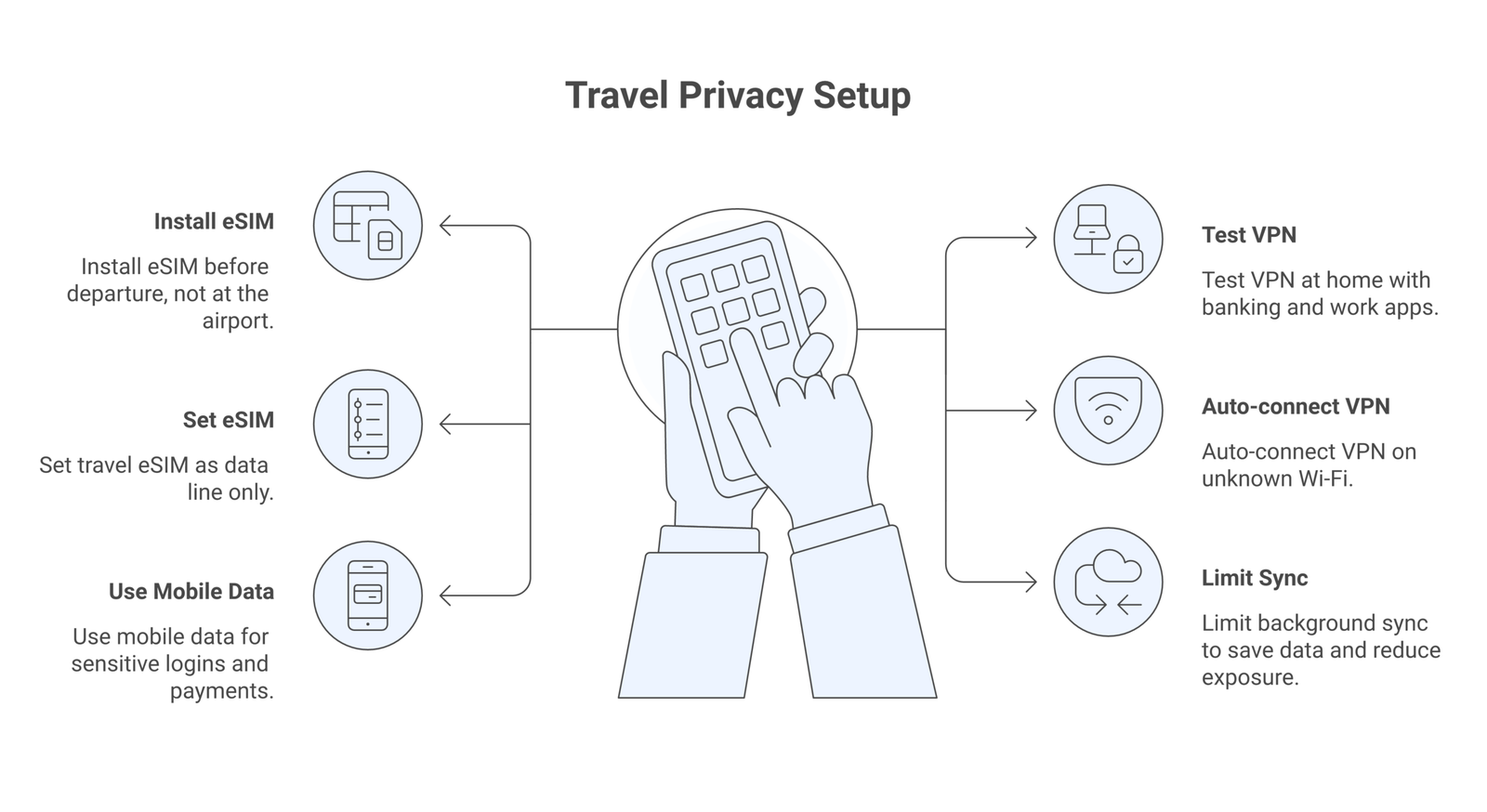
Keep your VPN set to auto-connect on unknown Wi-Fi, not on every network. That protects you where it matters without wrecking battery life or causing random app breakage.
Simple setup that actually works
You do not need a complicated privacy stack. A clean travel setup usually has four parts:
1. Install the eSIM before departure. Most modern iPhones and Pixel devices support digital activation, and the official setup pages from Apple and Google walk through dual-SIM management clearly.
2. Install the VPN and test it at home. Make sure your banking app, email, maps, and messaging still work. Do not discover a broken login while standing in immigration.
3. Set mobile data rules. Turn off unnecessary background sync, app store downloads, and auto-backup on mobile data. That protects both privacy and your data allowance. Our eSIM data management tips for travelers cover the settings worth checking.
4. Use Wi-Fi selectively. Hotel Wi-Fi is fine for streaming or casual browsing if your VPN is active, but I still prefer mobile data for payments, work logins, and anything that touches sensitive files.
📝 Important Note
A VPN can improve privacy, but it is not a license to ignore bad security habits. If a site looks fake, if a hotspot name is suspicious, or if an app asks for odd permissions, stop. The boring habits still matter.
Choosing the right eSIM plan for private travel
The best plan is not always the cheapest one. For strong eSIM VPN privacy abroad, you want stable coverage first, then enough data to keep the VPN on without babying every megabyte. VPN overhead is usually manageable, but it still adds some extra data use. If you buy the tiniest plan possible, you will spend the whole trip rationing traffic instead of enjoying it.
Regional plans can be smarter than single-country plans if your route is fluid. That is why travelers heading across Europe often compare eSIM offers against the EU roaming rules and then check dedicated options like our older piece on the best eSIM providers for Europe travel. For business trips or longer stays, look for providers with transparent top-up pricing and clear hotspot policies. Hidden tethering limits are annoying enough without throwing a VPN into the mix.
You should also check whether your provider supports the destinations you will actually visit, not just the country where you land. Border areas, ferries, and airport transfers are where weak plans show their cracks. A decent plan plus a tested VPN is far more useful than a flashy marketing page promising “ultimate digital freedom.” That phrase usually means nothing.
Public Wi-Fi abroad, the part travelers keep underestimating
This is where the VPN earns its keep. The FTC says public Wi-Fi is safer than it used to be because more traffic now uses HTTPS, but that is not the same as saying every hotspot is safe. Fake portals, weak passwords, and local snooping are still real issues. The NIST public Wi-Fi guidance says the quiet part out loud: treat public networks carefully and add protection when possible.
My rule is simple. If you can do it over mobile data, do it there. If you need Wi-Fi because the hotel walls are murdering your signal or you are downloading something large, turn on the VPN first, verify the network name with staff if needed, and avoid sensitive admin tasks if the connection feels sketchy. If you hit weird captive portal issues, our eSIM troubleshooting guide helps you separate network problems from device problems.
⚠️ Disclaimer
This article is for general travel connectivity education as of April 2026. eSIM coverage, VPN performance, roaming rules, and local regulations can change by provider and country. Always check your eSIM vendor, device manufacturer, and destination rules before you travel.
Common mistakes that break privacy fast
The first mistake is assuming cellular data is automatically private enough for everything. It is often safer than public Wi-Fi, yes, but that does not mean you should skip the VPN for sensitive work. The second mistake is leaving the VPN off because a few apps load slower. Tweak the server or protocol instead of giving up. The third mistake is forgetting device security basics entirely. Strong screen lock, automatic updates, and two-factor authentication still do more work than any fancy travel hack.
Another common problem is bad line management on dual-SIM phones. Travelers sometimes set the wrong line for data, calls, or fallback behavior and then blame the VPN when the real issue is line priority. If your phone supports dual-SIM or multiple profiles, check the vendor docs and keep the setup clean. Our article on eSIM security basics pairs well with this one if you want the bigger picture without drowning in telecom jargon.
Finally, do not buy into marketing that claims an eSIM alone will replace a proper VPN. Some providers add privacy tools, ad blocking, or location routing. Those extras can be useful, but they are not the same as choosing your own VPN service, configuring auto-connect, and knowing exactly when it is active.
Best practices before your trip
A half hour of prep saves a lot of nonsense on the road. Install the eSIM while you still have your home network. Confirm the QR code or activation flow works. Update your phone before departure. Test the VPN with the exact apps you rely on. Save offline maps. Download airline and hotel confirmations. If a login uses email or SMS verification, make sure you can still access it without your home SIM in active use.
This is also a good moment to decide how aggressive you want your privacy setup to be. Some travelers only care about safe browsing on hotel Wi-Fi. Others need a steadier configuration for client work, research, or managing company data from abroad. There is no single perfect setup, but there is a clear baseline: reputable eSIM, tested VPN, clean line settings, and enough data headroom to avoid turning everything off the moment you land.
If you follow that baseline, eSIM VPN privacy becomes manageable instead of mysterious. That is really the point. Travel tech should reduce friction, not create a new hobby in debugging mobile settings from a train platform.
Frequently Asked Questions
No. An eSIM gives you a digital mobile plan. A VPN encrypts your traffic. They solve different problems.
Should I keep my VPN on all the time while traveling?For work, banking, and public Wi-Fi, yes. For casual mobile browsing, it depends on your battery, speed, and risk tolerance.
Will a VPN use more data on my travel eSIM?Usually a bit more, yes. The overhead is often modest, but you should still buy enough data if you plan to keep the VPN active most of the day.
Is mobile data safer than hotel Wi-Fi abroad?In many cases, yes. But safer does not mean fully private. Sensitive tasks still benefit from a VPN.
Can I use one VPN across several country eSIMs on the same trip?Yes. Your VPN app sits above the mobile plan, so you can keep the same VPN configuration while switching between compatible eSIM profiles.